
This is a hands-on local ComfyUI review, not a highlight-reel summary. Across 30 official-workflow jobs — 10 text-to-video (T2V), 10 image-to-video (I2V), and 10 reference-to-video (R2V) — every job produced a playable H.264/AAC MP4 of about 5.17 seconds. Total measured generation time was about 45.3 minutes, and the highest observed peak VRAM was about 43.7 GiB.
MiniMax H3 is a strong local generator for exploring shots, anchoring a human reference, and building supervised source material. It is not a publish-without-review system: speech, text, hands, small objects, sports motion, and long-shot continuity need their own acceptance checks.
The verdict in plain language
H3 is most valuable when a team needs to turn a shot idea into something editable: a storyboard, concept trailer, social clip, mood piece, or previsualization pass. Text-to-video is the fastest route for invented scenes, image-to-video is the most useful way to anchor one person, and reference-to-video gives the most control when identity, wardrobe, or multiple visual references matter.
The important distinction is between a convincing shot idea and a trustworthy final shot. H3 often understands the composition, broad action, and camera intent, but it does not guarantee that every syllable, trajectory, prop, letter, or hand remains correct. Keep the winning seed and settings, generate alternatives, and review each selected shot at normal speed and frame by frame.
What I evaluated
The evidence set deliberately goes beyond calm landscapes and slow camera pushes. It covers speaking people, group interaction, rapid hand movement, cooking, boxing, basketball, football, cycling, animals, camera movement, product assembly, longer scenes, resolution changes, duration changes, queue behavior, repeatability, and audio-oriented prompts.
Each result was inspected as playable media and paired with its prompt, seed, resolution, frame count, sampler, scheduler, elapsed time, peak VRAM, and output preview. The full workflow evidence below exposes the trade-off between visual ambition, runtime, and memory instead of relying on a single average score.
Composition is strong; continuity still needs inspection
H3 frequently produces a complete-looking composition: lighting, atmosphere, depth, subject placement, and camera direction work together particularly well in wider and cinematic scenes. This makes it useful for directors and designers because an abstract treatment can become a concrete visual hypothesis quickly.
That attractive surface can hide continuity mistakes. A prop may change during a pan, a background may reorganize itself, or a limb may become ambiguous during an occlusion. Review composition first, then deliberately switch to forensic inspection of the first frame, middle, maximum-blur moment, and final frame.
Talking faces and audio
The close speaking-person samples show the widest gap between visual suggestion and production readiness. A face can appear to speak naturally while the requested line becomes repeated syllables, fragments, or unrelated sounds. An AAC stream only proves that audio is present; it does not prove that it is intelligible or semantically correct.
Use H3 to explore framing, expression, pauses, and speaker-camera relationships. For final dialogue, record the approved line separately or validate generated audio against the script, including captions. In two-person scenes, short shot-reverse-shot generations are more dependable than asking one clip to preserve identities, gaze, turn-taking, hands, and shared space all at once.
Hands, objects, sports, and camera motion
Rapid hand movement exposes the usual weak points. In card handling, cards can merge, multiply, change orientation, or lose their geometry during acceleration. The same risk applies to tools, buttons, utensils, and small product parts. Use H3 for rhythm and camera energy, then add a controlled insert when a contact or object state must be understood.
Sports prompts are energetic but should not be treated as rule-accurate. Players can appear to dribble, pass, shoot, tackle, or punch while feet, ball paths, body contact, or action order violate the sport. Use generated sports imagery for fiction, atmosphere, transitions, and montage; use filmed or simulated footage when the sequence makes a factual claim.
Tracking, orbiting, push-ins, whip pans, and chase views are among the most useful capabilities in the set. Camera movement can also conceal a prop swap or duplicated hand, so a visually exciting take becomes a final shot only when its checkpoint frames agree.
Products, long scenes, resolution, runtime, and VRAM
For products, a convincing atmosphere is different from a trustworthy demonstration. A technician can appear to handle a camera case, lens, battery, and controls while the final hand-object relationship becomes physically incompatible. Build manuals and training sequences as repairable inserts: one operation and one important object relationship per shot, with labels and exact interface text added in post.
Longer scenes allow drift to accumulate: props can change shape, lettering can appear unexpectedly, extra hands can emerge, and animals or objects can stop following the action established at the start. The useful editorial unit is often the clean passage rather than the whole file. Mark stable openings, middle actions, and endings, then cut around drift or generate a replacement insert.
More pixels increase both cost and the number of relationships that must remain stable. Start exploration at a moderate canvas, spend saved time on more candidates, then increase resolution only for the selected composition. Plan capacity around the slowest representative shot, keep VRAM headroom for the rest of the workstation, and write a result record after every queued job.
A controlled iteration workflow
A dependable H3 workflow has three stages: first, test subject count, camera direction, and action order; second, keep successful prompt structure and change one variable at a time; third, inspect the selected take at normal and reduced speed before exporting only the portion that passes the shot-specific check.
- Use T2V for ideation and invented scenes, I2V to anchor a first-frame human subject, and R2V when several reference roles must remain distinct.
- If a hand is wrong, simplify the contact; if the camera is wrong, shorten the move; if speech is wrong, remove final dialogue from the generation plan and replace the track.
- Choose a narrower tool for calm single-subject motion, and use filmed or simulated material whenever typography, product mechanics, sports rules, or factual continuity are central.
The model is productive for supervised creation because prompts can function as shot plans and ComfyUI records the controls. It is not a camera, a dialogue-recording system, a sports simulator, or a product-manual renderer.
Scorecard
Scroll horizontally to view all table columns.
| Area | Judgment |
|---|---|
| Composition and atmosphere | Strong; often produces a complete-looking shot. |
| Subject and scene readability | Good across many prompt types. |
| Fast hands and small objects | Unreliable; use inserts and inspect frame by frame. |
| Sports and physical rules | Visually energetic but not authoritative. |
| Speech and audio | Audio may exist without dependable sentence meaning. |
| Camera movement | One of the most useful strengths. |
| Long-shot continuity | Usable sections are common; one-take reliability is limited. |
| Local production workflow | Practical with VRAM headroom, queueing, and review. |
Current official-workflow evidence
These tables keep the three workflow families separate so the prompt, reference condition, media result, and measured cost can be checked independently. The I2V and R2V cases retain the actual reference role used by the source workflow.
T2V: text prompt only
Scroll horizontally to view all table columns.
| Case | Prompt | Resolution | Time | VRAM | Audit result | Video |
|---|---|---|---|---|---|---|
| single speech | A realistic locked-off chest-up close-up of an adult woman speaking clearly in English: 'Hello, this is a short video model test.' Natural mouth movement and blinking, one small nod, warm indoor light. No Chinese, no on-screen text, no logos, no subtitles, no readable writing. | 608x352 | 55.9s | 41.5 GiB | English speech is clear in the sampled audio; the woman remains stable in a locked close-up and no readable overlay text is visible. | |
| profile speech | A realistic side-profile shot of an adult man speaking clearly in English: 'The train leaves at sunrise.' Natural mouth shapes, eye movement, one small hand gesture, soft window light. | 736x416 | 80.7s | 42.0 GiB | Visual stable, but the audio includes extra words before the requested English line. | |
| dance solo | An adult female dancer performs a controlled contemporary dance phrase in a bright studio: two turns, one arm sweep, a low step, and a balanced finish. Full-body framing, smooth lateral camera tracking, no dialogue. | 864x480 | 121.0s | 42.4 GiB | Motion broadly coherent; unexpected speech remains in a no-dialogue test. | |
| walk and turn | An adult woman walks through a sunlit city plaza, turns toward the camera, smiles, raises one hand, and continues walking. Handheld documentary camera, no dialogue. | 608x352 | 55.5s | 41.5 GiB | Visual motion usable; unexpected speech remains in a no-dialogue test. | |
| fast hand action | An adult magician performs one fast but readable card shuffle and reveals one single card. Keep one deck, one revealed card, stable card geometry, no extra cards, close-up camera. | 736x416 | 80.7s | 42.0 GiB | The single-card reveal is now visually coherent, but unexpected speech remains in the audio. | |
| two people dialogue | Two adults at a cafe take turns speaking two short lines: 'Are you ready?' and 'Yes, let us begin.' They nod and point at a notebook. Medium two-shot, natural turn-taking. | 864x480 | 121.1s | 42.4 GiB | Conversation staging is readable and the target lines are present, but the audio repeats and adds words. | |
| sports run | An adult athlete runs straight in one marked track lane, passes one marker, slows down, and stops. No hurdles, no ball, no lane changes, clear foot contact, side tracking camera, no dialogue. | 608x352 | 55.5s | 41.5 GiB | Running shot is visually cleaner, but the audio is not a reliable sentence. | |
| emotion change | An adult man says clearly in English: 'I thought I had lost everything, but I was wrong.' He looks down, pauses, looks into camera, raises one hand, and smiles with relief. | 736x416 | 80.7s | 42.0 GiB | Visual emotion arc is readable and the intended English line was recognized. | |
| group reaction | Four adult coworkers stand beside a presentation board. One points to the board, two nod, and one smiles. Documentary camera, stable group positions, no dialogue, no readable text. | 864x480 | 121.1s | 42.4 GiB | Group staging is readable, but the audio is not a reliable spoken presentation. | |
| night street report | An adult reporter speaks clearly to camera on a safe, well-lit pedestrian street at night: 'Good evening. This is a short street report.' He turns to indicate one storefront and turns back. No readable signs. | 608x352 | 55.5s | 41.5 GiB | The reporter and street are clear, but the generated audio is not the requested report sentence. |
I2V: actual first frame plus prompt
Scroll horizontally to view all table columns.
| Case | Actual first frame | Prompt | Resolution | Time | VRAM | Audit result | Video |
|---|---|---|---|---|---|---|---|
| dancer push in | 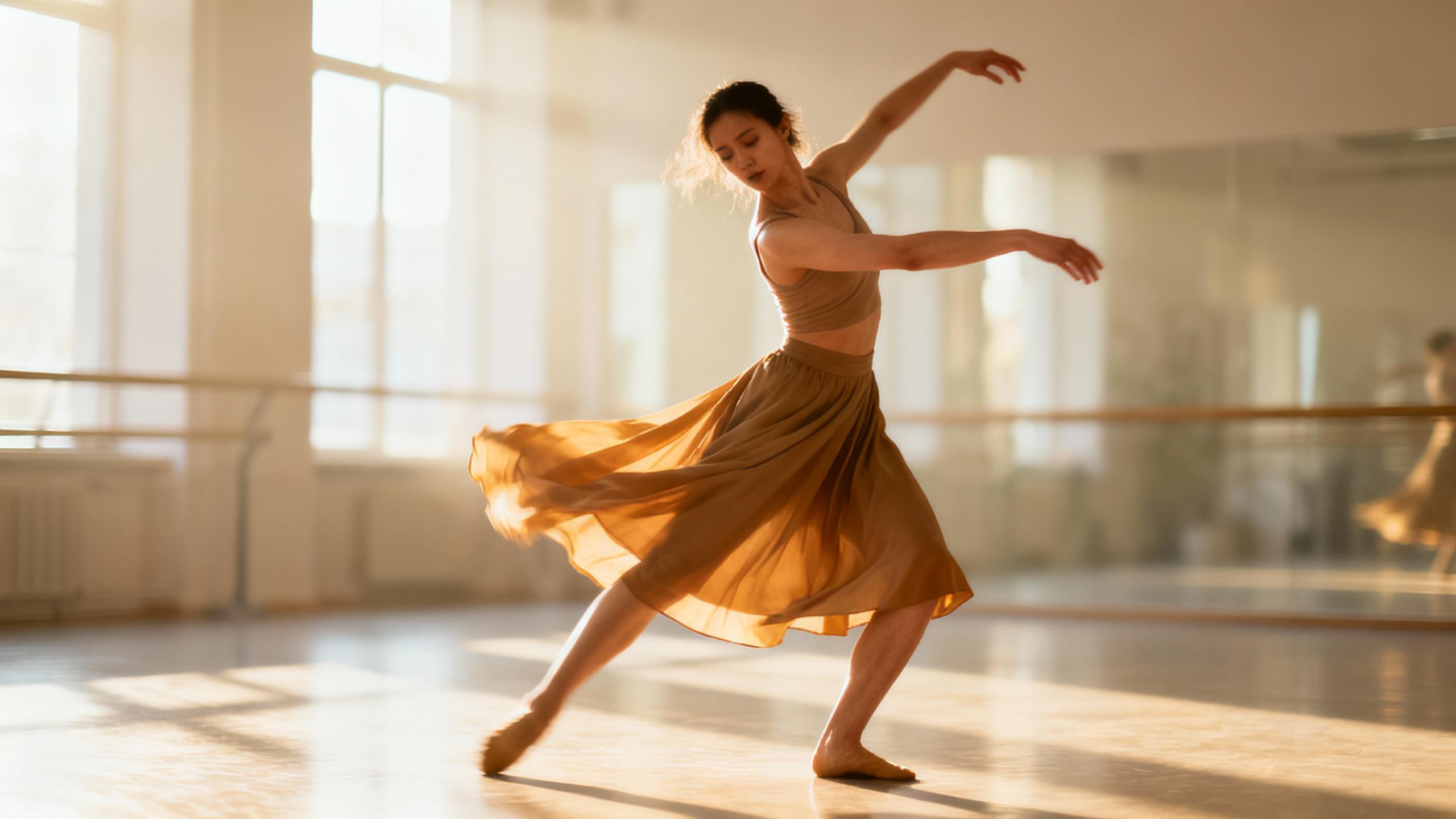 | Animate the adult dancer in the reference image. She performs a slow arm sweep, one controlled turn, and a stable finish. Preserve her face, clothing, studio lighting, and body proportions; gentle camera push-in. | 608x352 | 60.6s | 41.6 GiB | Correct dancer first frame; identity and studio motion are broadly consistent, with stray audio in a no-dialogue shot. | |
| woman speech | 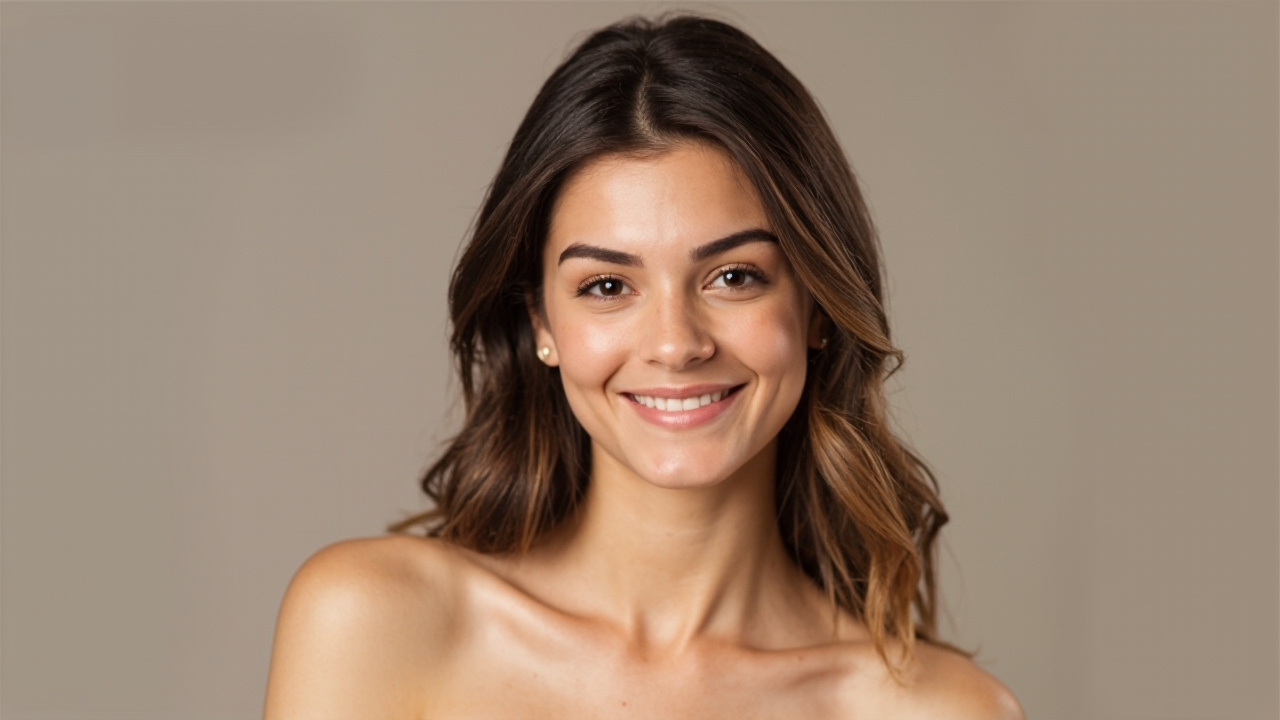 | Animate the adult woman in the reference portrait in a locked-off chest-up close-up. She speaks clearly in English: 'The weather is beautiful today.' Preserve the exact face, eyes, mouth, hair, and lighting. Natural blinking, no face morphing, no Chinese, no on-screen text, no logos, no subtitles, no readable writing. | 736x416 | 86.3s | 42.1 GiB | The reference woman remains recognizable in the sampled frames; the requested English sentence is present, with a small trailing audio error. | |
| man speech | 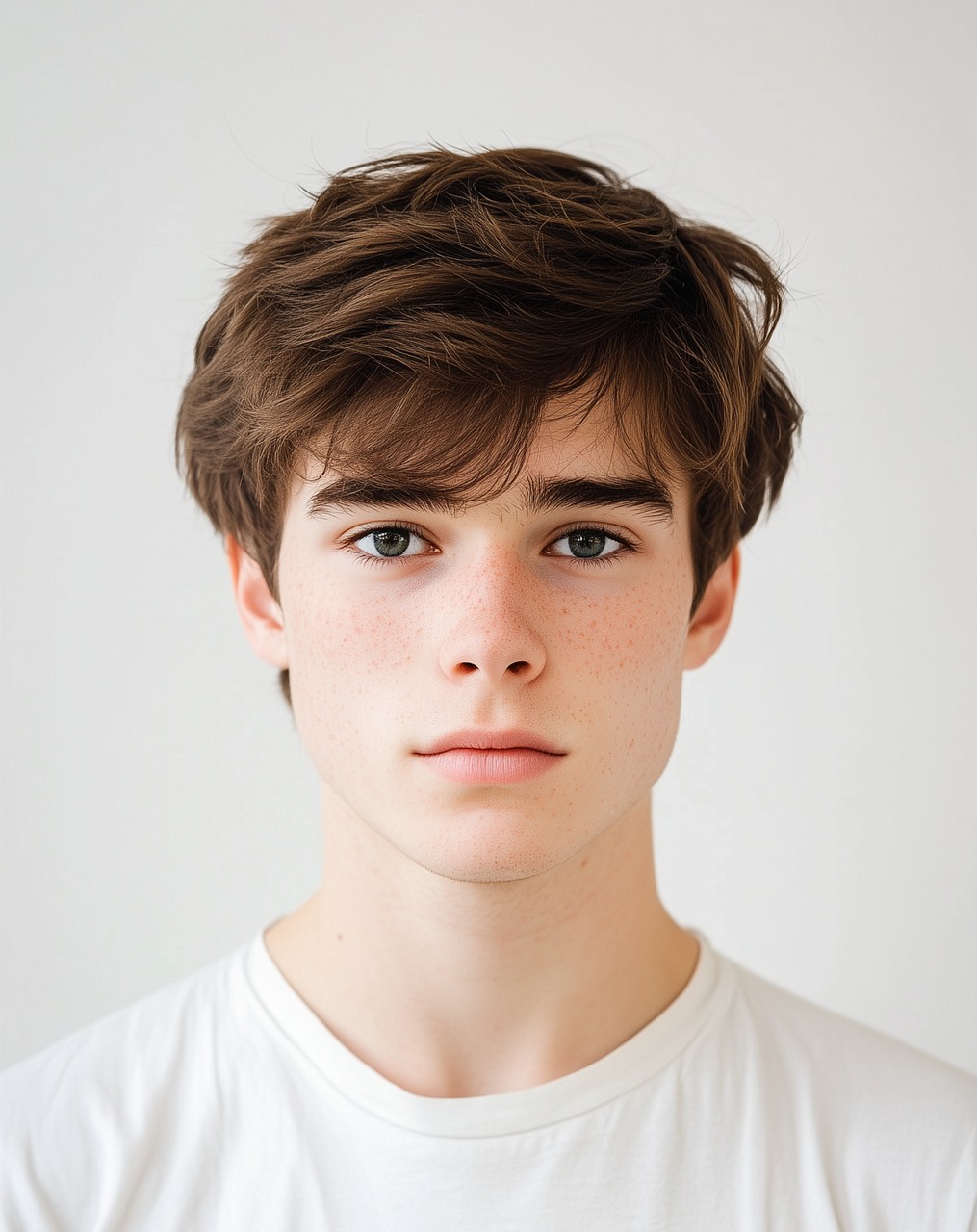 | Animate the adult man in the reference portrait in a locked-off chest-up close-up. He speaks clearly in English: 'This is a repeatability check.' Preserve the exact face, hairstyle, jaw, eyes, teeth, and skin texture. No head morphing, no extra teeth, no extra eyes, no text, no logos, no subtitles, no camera movement. | 608x352 | 55.9s | 41.6 GiB | The reference man remains stable in the sampled frames; the requested English sentence is recognizable and no obvious facial deformation is visible. | |
| child smile turn | 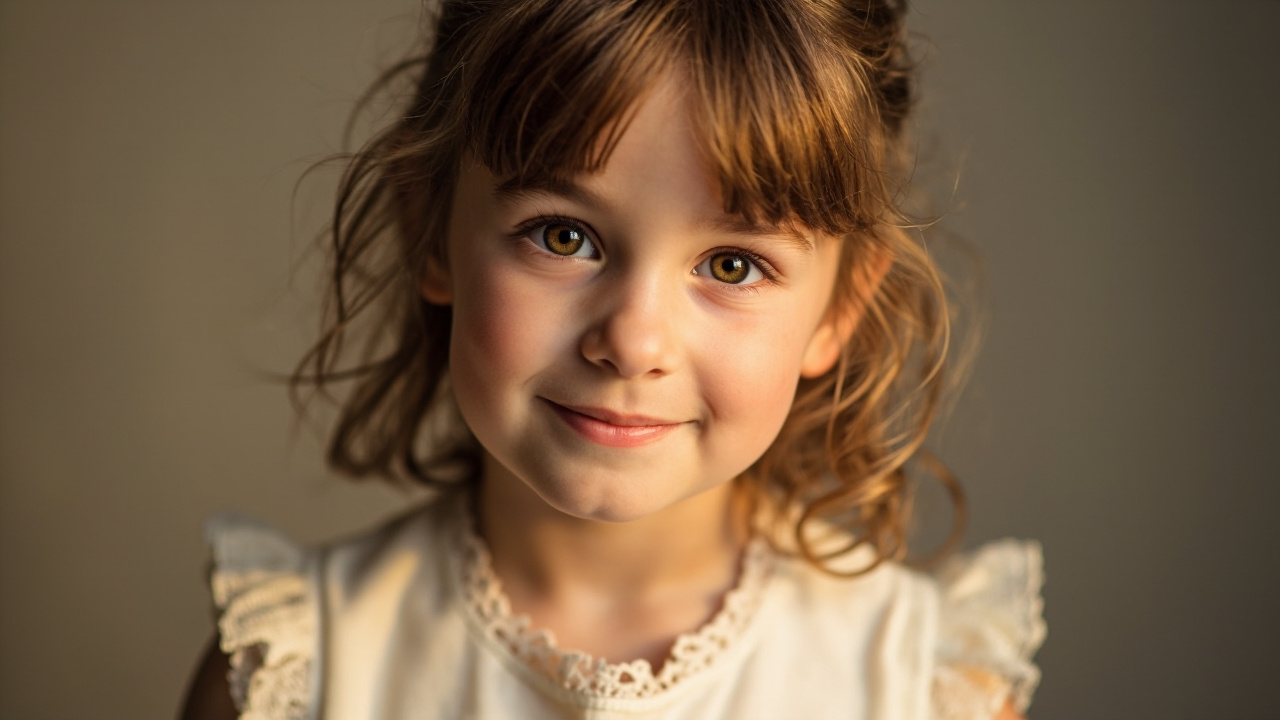 | Animate the same child in the reference portrait in a locked-off chest-up close-up. She tilts her head slightly, opens her mouth naturally in one short laugh, smiles, and closes her mouth. Preserve the exact child face, age, hair, clothing, and background. Two eyes, one nose, one mouth, no face morphing, no extra limbs, no text, no logos, no subtitles. | 736x416 | 86.3s | 42.1 GiB | The child remains recognizable with one face and consistent clothing; the mouth opens for the laugh, although the laugh is repetitive in the audio. | |
| woman walk | | Extend the adult woman reference into a realistic medium shot. She takes two steps through a softly lit interior, turns her shoulders, and looks back. Preserve identity, hair, clothing palette, and lighting. | 736x416 | 85.8s | 42.1 GiB | Correct woman first frame; the medium-shot expansion is broadly consistent; audio is treated as ambient-only. | |
| dancer fast motion | | The adult dancer from the reference performs a faster phrase with two clear arm changes and one turn. Preserve identity and outfit, keep two arms and five fingers, stable studio background, dynamic side camera. | 864x480 | 131.2s | 42.6 GiB | Correct dancer first frame; fast motion is usable but hands and skirt still need close inspection, with stray audio. | |
| man gesture | | Animate the same adult man in a locked-off chest-up close-up. He speaks clearly in English: 'One clear point is enough.' He slowly raises one hand once, shows five natural fingers, lowers it, and smiles. Preserve the exact face and hairstyle. No face morphing, no finger duplication, no text, no logos, no subtitles, no camera movement. | 864x480 | 127.0s | 42.6 GiB | The reference man remains recognizable; one raised hand and five fingers are readable in the sampled frames, with no obvious extra fingers or text overlay. | |
| child playful | | The child in the reference tilts her head, gives one small wave, and laughs softly. Preserve the same child face, hair, clothing, age, two arms, two hands, and background. No morphing, no extra limbs, no extra people. | 736x416 | 85.8s | 42.1 GiB | Correct child first frame; the child remains the same subject and the wave/laugh motion is much more stable, though the laugh is overly repeated. | |
| portrait lighting | | Create restrained portrait motion from the adult woman reference: slow camera move from medium close-up to close-up, one blink, subtle breath, and a small expression change. Preserve identity and facial structure. | 864x480 | 131.2s | 42.6 GiB | Correct woman first frame; the close-up and facial structure remain consistent. | |
| dancer wide | | Start from the adult dancer reference and reveal more of the studio as the camera pulls back. She performs one clean side step and a balanced pose. Preserve dancer, proportions, costume, sunlight, and floor reflections. | 608x352 | 55.5s | 41.6 GiB | Correct dancer first frame; the pull-back reveal is broadly usable, with stray audio in a no-dialogue shot. |
R2V: reference images plus prompt
Scroll horizontally to view all table columns.
| Case | Reference images | Prompt | Resolution | Time | VRAM | Audit result | Video |
|---|---|---|---|---|---|---|---|
| one face identity | woman portrait | Use Picture 1 as the identity reference. Create one adult woman walking through a quiet gallery, turning toward camera and smiling. Preserve face, hair, and natural proportions; no dialogue, no text. | 864x480 | 131.2s | 42.6 GiB | Reference identity is broadly maintained in the gallery shot; stray audio is not needed for this case. | |
| one man identity | man portrait | Use Picture 1 as the identity reference. Create one adult man speaking clearly in English: 'This is a controlled identity test.' Preserve facial identity and hairstyle; one natural hand gesture. | 608x352 | 55.5s | 41.6 GiB | Identity is readable and the requested sentence is present, but extra corrupted words follow it. | |
| dancer motion | dancer in studio | Use Picture 1 as the character and pose reference. The adult dancer performs one short contemporary phrase with a turn and controlled landing. Preserve identity, costume, studio, and graceful motion; no dialogue. | 736x416 | 85.8s | 42.1 GiB | Dance motion is readable and the reference role is clear; stray audio is not needed. | |
| child portrait | child portrait | Use Picture 1 as the identity reference. The same child looks around a sunny garden, waves once, and smiles. Preserve face, hair, clothing, age, and proportions; no dialogue, no extra people. | 864x480 | 131.2s | 42.6 GiB | Child reference is visually recognizable, but unrelated speech is present. | |
| identity plus style | woman portrait + dancer in studio | Use Picture 1 only for the adult woman identity. Use Picture 2 only for warm studio lighting. Do not copy the dancer body or face. Create one woman performing a slow expressive dance; preserve her identity and anatomy. | 608x352 | 60.6s | 41.6 GiB | The output now keeps the woman identity more clearly while borrowing the studio style; the boundary still needs close review. | |
| identity plus scene | man portrait + dancer in studio | Use Picture 1 only for the adult man identity and Picture 2 only for studio lighting. One man stands on the studio floor with both feet visible; no mirrors, no background people, no overlapping bodies, no limbs through objects. He says one clear sentence and gestures toward the floor. | 736x416 | 90.8s | 42.2 GiB | The man and studio remain spatially separated in the sampled frames; the added constraints substantially reduce the earlier穿模 problem, but this remains a shot to inspect frame by frame. | |
| two character refs | woman portrait + man portrait | Use Picture 1 and Picture 2 as two separate adult character references. Create a short cafe conversation with two clear lines: 'Are you ready?' and 'Yes, let us begin.' Keep their identities distinct, stable hands, and natural turn-taking. | 864x480 | 136.3s | 42.7 GiB | Two-person staging is readable and the target lines are present, but the audio repeats and adds words. | |
| portrait to action | man portrait | Use Picture 1 to preserve the adult man identity. Place him on a safe outdoor running track; he jogs toward camera, slows, and adjusts his shirt. Maintain face and hairstyle, no dialogue, realistic sports camera. | 608x352 | 55.5s | 41.6 GiB | The man remains broadly recognizable on the track; stray audio is present in a no-dialogue shot. | |
| portrait to night | woman portrait | Use Picture 1 to preserve the adult woman identity. Place her on a softly lit evening street; she walks beside one shop window, turns toward camera, and says clearly: 'Good evening. This is a short street report.' Avoid readable signs. | 736x416 | 85.8s | 42.1 GiB | The woman and shop scene are readable and the requested street-report sentence is present. | |
| multi reference story | dancer in studio + woman portrait + man portrait | Use Picture 1 only for dance motion, Picture 2 only for the adult woman identity, and Picture 3 only for the adult man identity. In one bright studio, the woman performs one step, the man observes and nods, then they exchange one gesture. Keep all roles distinct, no overlapping bodies, no dialogue. | 864x480 | 146.3s | 42.8 GiB | The three roles remain distinct in the sampled frames; no-dialogue audio still contains an unwanted vocal fragment. |
Technical snapshot
Scroll horizontally to view all table columns.
| Metric | Measured result |
|---|---|
| Total cases | 30 |
| T2V / I2V / R2V | 10 / 10 / 10 |
| Successful jobs | 30 / 30 |
| Technical media checks | 30 / 30 |
| Duration per clip | about 5.167 s |
| Frame rate | 24 fps |
| Total generation time | about 45.3 min |
| Average job time | about 90.5 s |
| Maximum peak VRAM | about 43.7 GiB |
| Container streams | H.264 video + AAC audio |
MiniMax H3 ComfyUI setup
The official ComfyUI documentation provides H3 workflow templates for T2V, I2V, and R2V. Start with a current ComfyUI installation and matching H3 nodes, import the official JSON graph in the browser, and select model files that match that graph rather than rebuilding it from memory.
- Linux and NVIDIA baseline: cd ComfyUI; uv venv; source .venv/bin/activate; uv pip install -r requirements.txt; python main.py --listen 0.0.0.0 --port 8198 --lowvram.
- Model download baseline: uv pip install modelscope; modelscope download --model Comfy-Org/MiniMax-H3 --revision master --local_dir models diffusion_models/minimax_h3_ref2va_pruned_fp8_scaled.safetensors.
- Place the VAE, text encoder, main diffusion checkpoint, and R2V reference checkpoint in the directories selected by the official graph. Use an explicit integer for controls such as bit_depth, begin with moderate resolution and frame count, then raise one variable at a time.
FAQ and sources
Which workflow should I start with?
Use T2V to verify installation. Use I2V when you have a suitable human or character image, and use R2V when identity or multiple references are central to the shot.
Does H3 guarantee intelligible speech?
No. A face can look as if it is speaking while audio is unclear or the intended sentence is not reliable. Treat speech as a separate acceptance gate.
Is R2V worth the extra memory?
For identity-driven work, yes. It was the most useful route for reference control in this test, but it needs clean inputs, clear prompts, and memory headroom.
Can I use the output directly in a commercial video?
Use it as supervised source material. Review every accepted shot, check permissions for human images and voices, verify model and asset licensing, and do not present synthetic people or speech as real recordings without proper context.
Sources
- ComfyUI official MiniMax H3 workflow guide: https://docs.comfy.org/tutorials/video/minimax/minimax-h3
- MiniMax H3 model files on ModelScope: https://www.modelscope.cn/models/Comfy-Org/MiniMax-H3/summary
- ComfyUI official repository: https://github.com/Comfy-Org/ComfyUI
- MiniMax video-generation documentation: https://platform.minimax.io/docs/guides/video-generation
Sources and verification
- MiniMax H3 official release
- ComfyUI official MiniMax H3 workflow guide
- ComfyUI official repository
- MiniMax official video-generation documentation
Specifications, prices, and availability can change. Check the linked first-party documentation before making production or purchasing decisions.